xcp_d.workflows.anatomical.surface module
Workflows for processing surface anatomical files.
- xcp_d.workflows.anatomical.surface.init_ants_xfm_to_fsl_wf(mem_gb, name='ants_xfm_to_fsl_wf')[source]
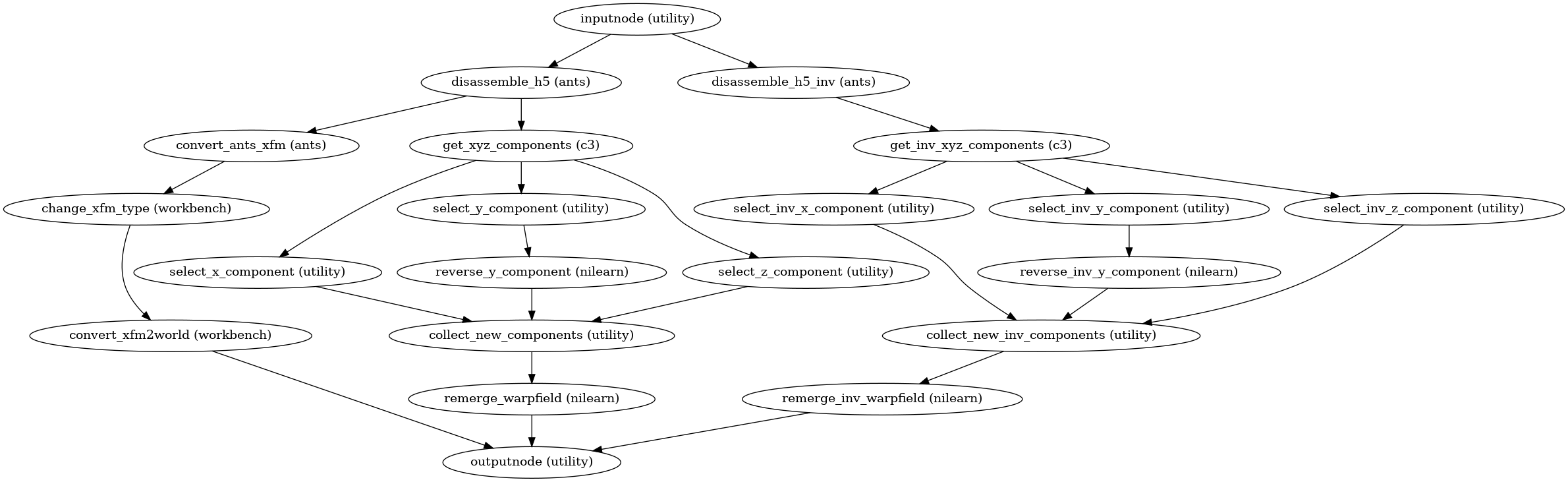
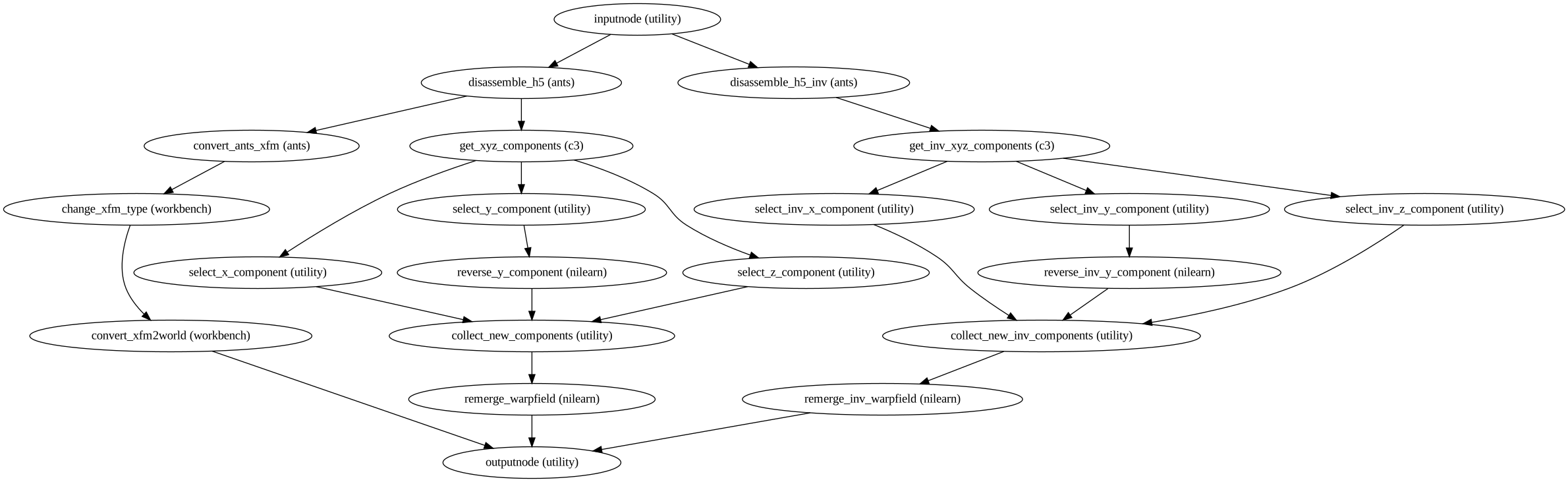
Modify ANTS-style fMRIPrep transforms to work with Connectome Workbench/FSL FNIRT.
XXX: Does this only work if the template is MNI152NLin6Asym?
- Workflow Graph
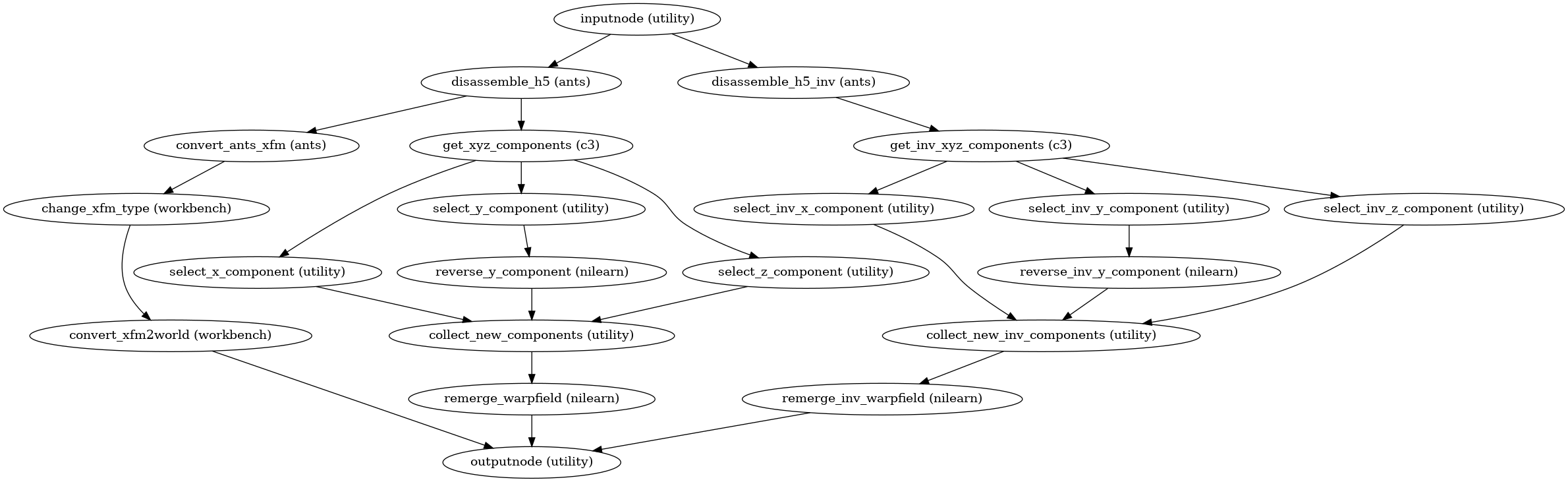
(Source code, png, svg, pdf)
- Parameters:
- Inputs:
anat_to_template_xfm – ANTS/fMRIPrep-style H5 transform from anatomical image to template.
template_to_anat_xfm – ANTS/fMRIPrep-style H5 transform from template to anatomical image.
- Outputs:
world_xfm – The affine portion of the volumetric anatomical-to-template transform, in NIfTI (world) format.
merged_warpfield – The warpfield portion of the volumetric anatomical-to-template transform, in FSL (FNIRT) format.
merged_inv_warpfield – The warpfield portion of the volumetric template-to-anatomical transform, in FSL (FNIRT) format.
- xcp_d.workflows.anatomical.surface.init_generate_hcp_surfaces_wf(name='generate_hcp_surfaces_wf')[source]
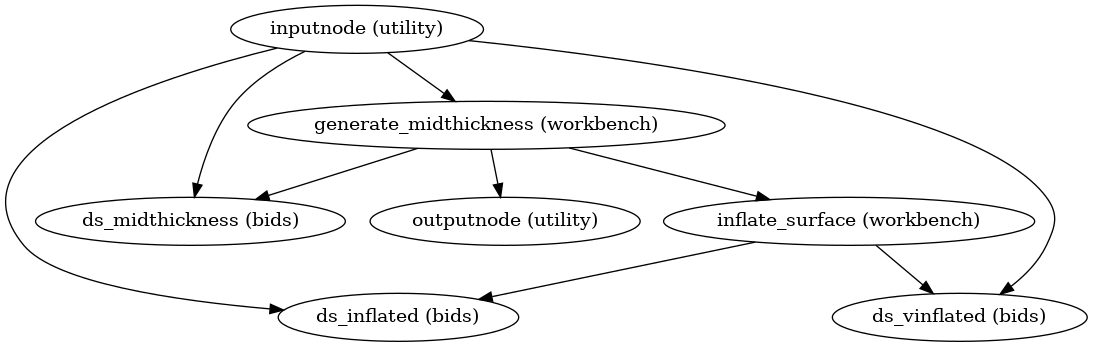
Generate midthickness, inflated, and very-inflated HCP-style surfaces.
- Workflow Graph
(Source code, png, svg, pdf)
- Parameters:
name (
str, optional) – Name of the workflow. This is used for working directories and workflow graphs. Default is “generate_hcp_surfaces_wf”.- Inputs:
- xcp_d.workflows.anatomical.surface.init_postprocess_surfaces_wf(mesh_available, standard_space_mesh, morphometry_files, t1w_available, t2w_available, software, name='postprocess_surfaces_wf')[source]
Postprocess surfaces.
If DCAN QC is enabled, this will generate a BrainSprite for the executive summary. If process-surfaces is enabled or fsLR-space mesh files are available, then the BrainSprite will use standard-space mesh files. Otherwise, it will use the native-space mesh files.
If process-surfaces is enabled and mesh files (i.e., white and pial surfaces) are available in fsnative space, this workflow will warp them to fsLR space. If process-surfaces is enabled and the mesh files are already in fsLR space, they will be copied to the output directory. These fsLR-space mesh files retain the subject’s morphology, and are thus useful for visualizing fsLR-space statistical derivatives on the subject’s brain. The workflow will also rigidly align the meshes to the MNI152NLin6Asym template, so that they can be overlaid on top of the template for visualization.
As long as process-surfaces is enabled and mesh files (in either space) are available, HCP-style midthickness, inflated, and very-inflated surfaces will be generated from them.
If process-surfaces is enabled and morphometry files (e.g., sulcal depth, cortical thickness) are available in fsLR space, they will be copied to the output directory.
- Workflow Graph

(Source code, png, svg, pdf)
- Parameters:
mesh_available (bool)
standard_space_mesh (bool)
morphometry_files (list of str)
t1w_available (bool) – True if a T1w image is available.
t2w_available (bool) – True if a T2w image is available.
software ({“MCRIBS”, “FreeSurfer”}) – The software used to generate the surfaces.
name (
str, optional) – Name of the workflow. This is used for working directories and workflow graphs. Default is “postprocess_surfaces_wf”.
- Inputs:
t1w – Preprocessed T1w file. May be in native or standard space.
t2w – Preprocessed T2w file. May be in native or standard space.
anat_to_template_xfm (
str) – Path to the T1w-to-MNI transform file. May be “identity”, for testing purposes.template_to_anat_xfm (
str) – Path to the MNI-to-T1w transform file. May be “identity”, for testing purposes.lh_pial_surf, rh_pial_surf
lh_wm_surf, rh_wm_surf
lh_subject_sphere, rh_subject_sphere
sulcal_depth
sulcal_curv
cortical_thickness
cortical_thickness_corr
myelin
myelin_smoothed


- xcp_d.workflows.anatomical.surface.init_warp_one_hemisphere_wf(hemisphere, software, mem_gb, omp_nthreads, name='warp_one_hemisphere_wf')[source]
Apply transforms to warp one hemisphere’s surface files into standard space.
Basically, the resulting surface files will have the same vertices as the standard-space surfaces, but the coordinates/mesh of those vertices will be the subject’s native-space coordinates/mesh. This way we can visualize surface statistical maps on the subject’s unique morphology (sulci, gyri, etc.).
- Workflow Graph
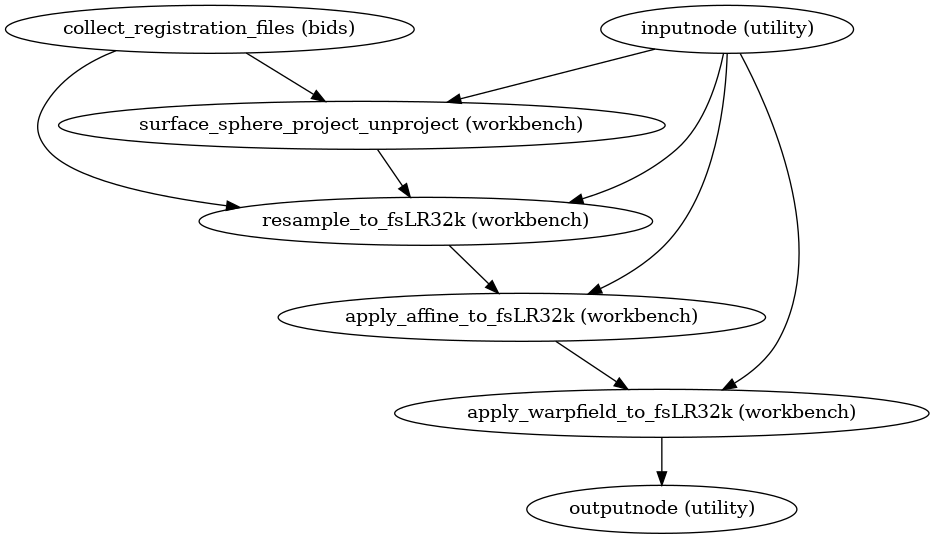
(Source code, png, svg, pdf)
- Parameters:
hemisphere ({“L”, “R”})
software ({“MCRIBS”, “FreeSurfer”}) – The software used for the segmentation.
mem_gb (
float) – Memory limit, in gigabytes.omp_nthreads (
int) – Maximum number of threads an individual process may use.name (
str, optional) – Name of the workflow. This is used for working directories and workflow graphs. Default is “warp_one_hemisphere_wf”.
- Inputs:
hemi_files (list of str) – A list of surface files (i.e., pial and white matter) for the requested hemisphere, in fsnative space.
world_xfm – The affine portion of the volumetric anatomical-to-template transform, in NIfTI (world) format.
merged_warpfield – The warpfield portion of the volumetric anatomical-to-template transform, in FSL (FNIRT) format.
merged_inv_warpfield – The warpfield portion of the volumetric template-to-anatomical transform, in FSL (FNIRT) format.
subject_sphere – The subject’s fsnative sphere registration file to fsaverage (sphere.reg in FreeSurfer parlance). The file contains the vertices from the subject’s fsnative sphere, with coordinates that are aligned to the fsaverage sphere.
- Outputs:
warped_hemi_files (list of str) – The
hemi_fileswarped from fsnative space to standard space.
Notes
Steps:
Collect the registration files needed for the warp.
- Convert the subject’s sphere to a GIFTI file.
This step is unnecessary since fMRIPrep and Nibabies already write out a GIFTI file.
Project the subject’s fsnative-in-fsaverage sphere to a high-resolution target-sphere-in-fsaverage-space. This retains the subject’s fsnative sphere’s resolution and vertices (e.g., 120079 vertices), but the coordinates are now aligned to the target sphere’s space.
For Freesurfer, this is the fsLR-164k-in-fsaverage sphere.
For MCRIBS, this is the dhcpAsym-41k-in-fsaverage sphere.
Nibabies and fMRIPrep do this already to produce the space-<fsLR|dhcpAsym>_desc-reg_sphere files, so XCP-D could directly use those and skip this step.
Apply the warped sphere from the previous step to warp the pial and white matter surfaces to the target space. This includes downsampling to 32k.
For Freesurfer, this means the coordinates for these files are fsLR-32k.
For MCRIBS, this means the coordinates for these files are dhcpAsym-32k.
Apply the anatomical-to-template affine transform to the 32k surfaces.
Apply the anatomical-to-template warpfield to the 32k surfaces. This and the previous step make it so you can overlay the pial and white matter surfaces on the associated volumetric template (e.g., for XCP-D’s brainsprite).
The important thing is that the volumetric template must match the template space used here.
- xcp_d.workflows.anatomical.surface.init_warp_surfaces_to_template_wf(software, omp_nthreads, name='warp_surfaces_to_template_wf')[source]
Transform surfaces from native to standard fsLR-32k space.
The workflow will also rigidly align the meshes to the MNI152NLin6Asym template, so that they can be overlaid on top of the template for visualization.
- Workflow Graph
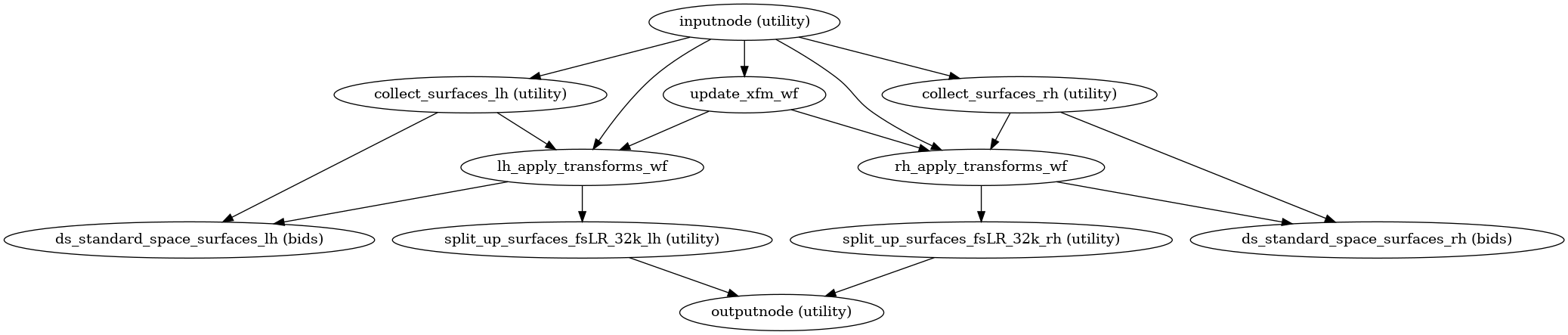
(Source code, png, svg, pdf)
- Parameters:
software ({“MCRIBS”, “FreeSurfer”}) – The software used to generate the surfaces.
omp_nthreads (
int) – Maximum number of threads an individual process may use.name (
str, optional) – Name of the workflow. This is used for working directories and workflow graphs. Default is “warp_surfaces_to_template_wf”.
- Inputs:
anat_to_template_xfm (
str) – Path to the T1w-to-MNI transform file. May be “identity”, for testing purposes. The template in question should match the volumetric space of the BOLD CIFTI files being processed by the main xcpd workflow. For example, MNI152NLin6Asym for fsLR-space CIFTIs.template_to_anat_xfm (
str) – Path to the MNI-to-T1w transform file. May be “identity”, for testing purposes. The template in question should match the volumetric space of the BOLD CIFTI files being processed by the main xcpd workflow. For example, MNI152NLin6Asym for fsLR-space CIFTIs.lh_subject_sphere, rh_subject_sphere (
str) – Left- and right-hemisphere sphere registration files.lh_pial_surf, rh_pial_surf (
str) – Left- and right-hemisphere pial surface files in fsnative space.lh_wm_surf, rh_wm_surf (
str) – Left- and right-hemisphere smoothed white matter surface files in fsnative space.
- Outputs: